
Menu du compte de l'utilisateur

  • Log in

Navigation principale

  • Home Page
  • All CMS
  • Tutorials
  • White Paper
Home
Guide CMS

Breadcrumb

  • Home
  • Tutorials
  • Drupal User Guide
  • Chapter 6. Setting Up Content Structure
  • 6.9. Changing Content Entry Forms

Language selector

  • Français
  • English

Main navigation

  • Home Page
  • All CMS
  • Tutorials
  • White Paper

User login

CAPTCHA
This question is for testing whether or not you are a human visitor and to prevent automated spam submissions.
  • Create new account
  • Reset your password

Book navigation

  • Tutorials
    • Drupal User Guide
      • Preface
      • Chapter 1. Understanding Drupal
      • Chapter 2. Planning Your Site
      • Chapter 3. Installation
      • Chapter 4. Basic Site Configuration
      • Chapter 5. Basic Page Management
      • Chapter 6. Setting Up Content Structure
        • 6.1. Adding a Content Type
        • 6.2. Deleting a Content Type
        • 6.3. Adding Basic Fields to a Content Type
        • 6.4. Concept: Reference Fields
        • 6.5. Concept: Taxonomy
        • 6.6. Setting Up a Taxonomy
        • 6.7. Adding a Reference Field
        • 6.8. Concept: Forms and Widgets
        • 6.9. Changing Content Entry Forms
        • 6.10. Concept: View Modes and Formatters
        • 6.11. Changing Content Display
        • 6.12. Concept: Image Styles
        • 6.13. Setting Up an Image Style
        • 6.14. Concept: Responsive Image Styles
        • 6.15. Concept: Text Formats and Editors
        • 6.16. Configuring Text Formats and Editors
      • Chapter 7. Managing User Accounts
      • Chapter 8. Blocks
      • Chapter 9. Creating Listings with Views

Guy Vigneault

6.9. Changing Content Entry Forms

By Guy Vigneault | 1:09 AM EDT, Tue March 10, 2026

Goal

Change the Recipe form to use a different widget to enter terms in the Ingredients field.

Prerequisite knowledge

  • Section 6.1, “Adding a Content Type”
  • Section 6.3, “Adding Basic Fields to a Content Type”
  • Section 6.5, “Concept: Taxonomy”
  • Section 6.8, “Concept: Forms and Widgets”

Site prerequisites

The Recipe content type must exist, and it must have an Ingredients taxonomy term reference field. At least one Vendor content item must exist. See Section 6.1, “Adding a Content Type” and Section 6.6, “Setting Up a Taxonomy”.

Steps

  1. In the Manage administrative menu, navigate to Content > Add content > Recipe (node/add/recipe) to look at the content entry form that is set up by default. Notice how you have to enter ingredients one by one, instead of having a more compact format.
  2. In the Manage administrative menu, navigate to Structure > Content types (admin/structure/types). Then click Manage form display on the dropdown button for the Recipe content type. The Manage form display page appears.
  3. For the Ingredients field, select Autocomplete (Tags style) in the Widget column.
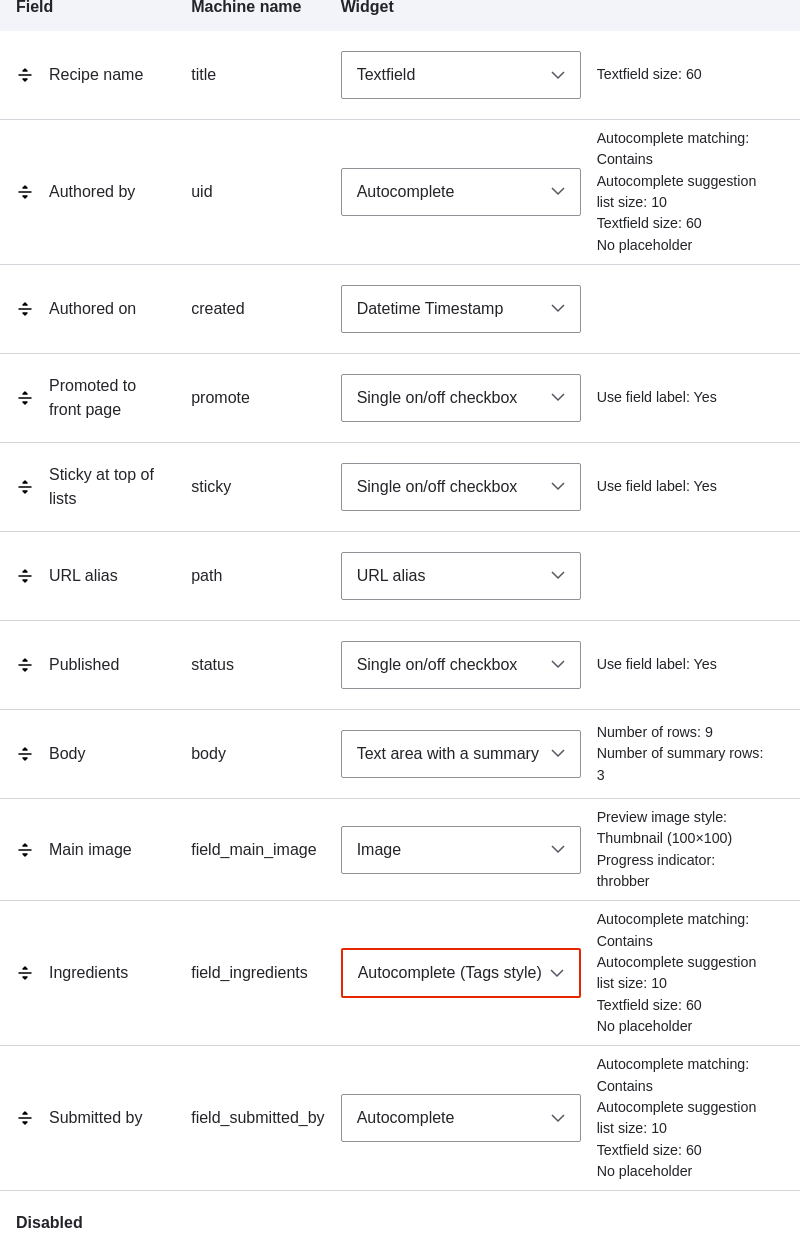
    Manage the Recipe form

  4. Click Save.
  5. In the Manage administrative menu, navigate to Content > Add content > Recipe (node/add/recipe) to verify the changed behavior of the content form. The Ingredients field is now a single text field that accepts multiple values.
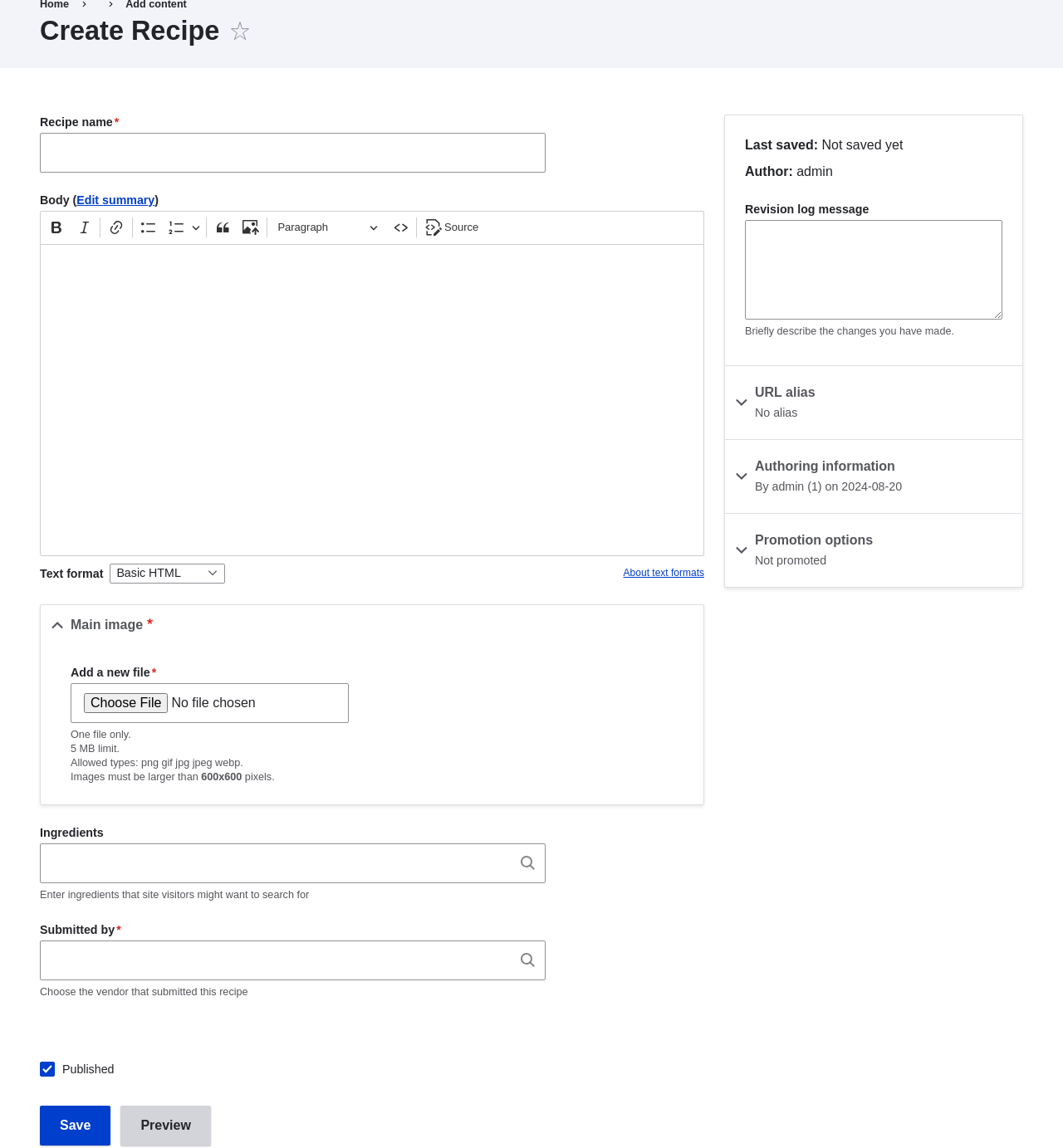
    Add a recipe

  6. Create two Recipe content items (see Section 5.2, “Creating a Content Item”), such as recipes for "Green Salad" and "Fresh Carrots". Make sure all the fields have values, including images, ingredients, and submitted by (set this to one of the Vendor content items you created in Section 6.3, “Adding Basic Fields to a Content Type”).

Expand your understanding

Change the main site Contact form by navigating in the Manage administrative menu to Structure > Contact forms. For instance, you may want to hide the Send yourself a copy or Language fields.


Videos

Changing Content Entry Forms

Attributions

Written by Boris Doesborg.


Book traversal links for Tutorials

  • ‹ 6.8. Concept: Forms and Widgets
  • Up
  • 6.10. Concept: View Modes and Formatters ›
CMS


All CMS


Tuto


Tutorials


White Paper


White Paper

Powered by Drupal

Privacy Policy

Privacy Policy


Recent content

  • 9.3. Creating a Content List View
    5 days 7 hours ago
  • 9.2. Concept: The Parts of a View
    5 days 7 hours ago
  • 9.1. Concept: Uses of Views
    5 days 7 hours ago
  • Chapter 9. Creating Listings with Views
    5 days 7 hours ago
  • 8.3. Placing a Block in a Region
    1 month 2 weeks ago

Copyright

Creative Commons

Sauf mention contraire, Guide CMS © 2025 par Guy Vigneault est sous licence Creative Commons Attribution - Utilisation non commerciale - Partage dans les mêmes conditions 4.0 International


Creative Commons

Unless otherwise stated, Guide CMS © 2025 by Guy Vigneault is licensed under Creative Commons Attribution-NonCommercial-ShareAlike 4.0 International Public License

eGV Web
